Alternatives to Lightroom

If you have a big investment into Adobe Lightroom, its catalogue and backend database then moving is a difficult thing.

For image editing Lightroom and Capture One are now the big two, with a couple of others coming up quickly.  I generally discount software from the camera companies, its at its best terrible and at its worse a crashing virus on your computer.

I keep reading good things about Capture One and as a PhaseOne medium format back owner I have a license, but I still just use Lightroom.  Fuji users in particular are always singing the praises of Capture One as it took Adobe a long time to come to grips with the X-Trans Sensor that is in the X series DX crop bodies of Fuji cameras.

But I read an interesting article the other day on Photography Life and he points out that Capture One does not support none Phase medium format cameras; something I had not noticed.  It certainly puts me of the product.

I am thinking hard at the moment about my future in 35mm full frame and large format, the Hasselblad may go back to just film use and I may trade in my 35mm Nikon gear and Phase One back for a more modern medium format solution that supports my studio and landscape needs.  With Capture One only supporting PhaseOne on medium format, I will not be making it limit my camera choice, so Adobe have me for a while longer.

Consistant File Names

Lightroom reporting a different file name then the one on the memory card

If your like me or most professional photographers then you take a lot of pictures when shooting digital.

Being able to find photographs afterwards in your asset management system is important, and with modern meta data and database systems, the actual file name is becoming less important.

Sometimes though the file name is all you have to go on if your using more then one workflow.

With my desktop Lightroom catalogue, the new cloud based Lightroom CC on my laptop, iPhone and iPad, then keeping track of what I have imported and what I have not can get difficult.

At the weekend i’ll be shooting in the studio with several models and using several different cameras.  Afterwards my work flow will be fairly straight forward.

  1. Copy all the cards to the internal SSD of my Desktop Machine
    1. These then will get backed up by my automatic PC backup
  2. Import to Lightroom Classic
    1. This copies the files to my main external Thunderbolt Drive
    2. This also makes a backup copy to Dropbox
  3. Initial metadata and develop by preset
  4. Then sorting out selects and picks to do a final edit on

When I am shooting more informally then the work flow may be the above, but its more likely me just grabbing the card at the end of the day and then copying the files to Dropbox to sort another day.  Or using my iPad SD Card reader and pulling in the photographs to Lightroom Mobile, or even using the Leica Mobile iOS app to pull off the odd photography.

The problem with these other workflows is that sometimes the process, it the Leica App or the iOS operating system itself is changing the file names.  This then makes it difficult to keep track what photographs have been imported into my master library on the desktop machine and what are still to import.  If not careful you can either loose photographs or end up with duplicate shots in your library.

Noctilux-M 75mm

We have had quite a bit of news from Leica over the last few weeks.

On the camera front we have the new Leica CL (review here from Jonathan Slack), which is growing on me but I must keep saying no.  For how I would use that camera an Olympus Pen-F would do just as well and for the price I could get a few nice Olympus lens as well.  We also had a special edition Leica M240 in Red.

We had the second of Leica’s old classic lens released plus they have been releasing a few of the modern lens in the old classic look lens bodies.

We have been hearing rumours over the last couple of months of a new Noctilux and not a 50mm, but some have said it will be a wide angle others have been saying a short or long portrait lens either 75mm or 90mm.  Well this week we finally had the official announcement.

The new Noctilux is a 75mm f/1.25 ASPH.  In the sample photographs the images look absolutely stunning, the options available to you with depth of field and the stunning bokeh.  The look you can achieve is outrageous but then so is the price.

Working with Adobe Lightroom Classic, CC and Mobile

I was not sure I would use Lightroom CC (the new cloud based solution not what they now call Classic), but this month I have been playing with it a little and decided there are some useful elements that I may be able to incorporate into my workflow.

In Lightroom Classic (what used to be called Lightroom or Lightroom CC), I generally have one large catalogue on my master desktop machine.  This means when I am working away I need a separate catalogue on my laptop.  This I usually keep in my Dropbox.

When shooting on holiday or when round town, i’ll sometimes take a break in a coffee shop.  While enjoying my coffee i’ll import the photographs using the Leica iOS app into my iPhone or iPad, these get imported into Lightroom Mobile which means if I want to later do any more editing the photographs are on my desktop machine.  The issue is; if I was away from home I could only then work on the images on the iPhone or iPad as the Cloud can only sync with one catalogue and I have it set to my master catalogue.  My laptop would not get the images synced across.

But now we have some more options.  If working on my laptop I use Lightroom CC and store the images in the cloud.  If I have used my iPad or iPhone the images also appear and can be worked on in Lightroom CC.  Once back to my desktop as the master catalogue syncs with my cloud the photographs are also there, so we have a way of working on the same images across multiple desktops and devices.  Useful.

Leica CL Digital

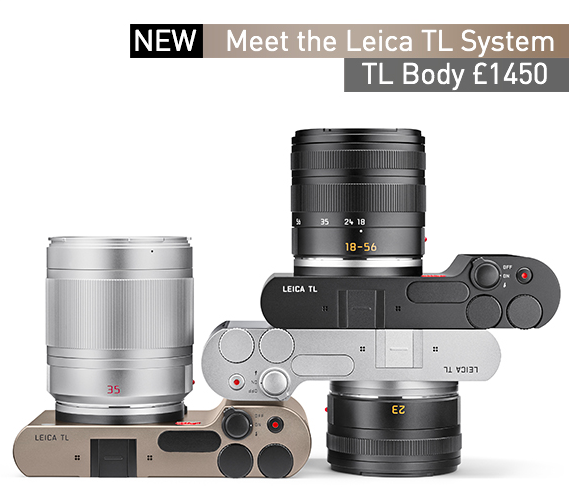
The Leica CL was a cheaper Leica M and did well, the new Leica CL is a camera I have been waiting for Leica to produce for the last few years and it excites me greatly.

The Leica Vario was marketed as a mini Leica M, and because of this if failed.  It was a good camera and fitted a niche well but because of the marketing people were expecting something it was not.

The Leica CL takes the best parts of the Leica X series, Leica Q and Leica TL and produces a real photographers mirrorless camera.

If your looking for a new camera then an Olympus, Sony or Panasonic mirrorless camera may be better but if you want a Leica and to be able to use Leica’s TL and SL glass plus all the old M glass and even R glass in a small modern mirrorless camera then its the one to pick.

I can imagine a lot of older photographers whose eyesight is now getting the better of them, trading their Leica M’s for this and still being able to use there favourite glass collected over the years.

For many photographers its what they expected the Leica TL2 to be.


Wildlife Photography with a Leica M

I was doing a bit of market stall photography at the Autumn Market, so was shooting with my Leica M10.  We also took a stroll through the grounds of the local country house and came across the deer.

Now a Leica M with a 50mm lens is not the best choice for wildlife, but in situations like this you use what you have.

Sony’s Medium Format Sensor Roadmap

With all the interest currently being shown in high resolution sensors, its with great timing Sony have released their latest medium format sensor roadmap.

The Pentax, Fuji and new Hasselblad all use the more affordable 50 MP sensors but we have 100 MP version coming in or soon after 2018.  More important then just higher resolution the new sensors deliver nearly 100% faster data read speeds so expect the next generation of mirrorless medium format cameras to be much faster.  For the big boys, and were are talking high end PhaseOne and Hasselblad H series cameras we have a 150 MP sensor coming soon.  Exciting times ahead.