Dynamic Range – Film Verses Digital

Digital has many advantages over film, and I will be the first to admit, I shoot far more digital then film. Most of it will be on my my Nikon D200’s. I also have lots of fun, and have many treasured images from my iPhone, and my very old Nikon S3 Compact.

One of the advantages of digital is that it is a) very convenient but also b) has more dynamic range then slide film. There is also the instant feed back factor, which makes it a great teaching aid.

In comparison to digital I shoot very little film, and often I can be disappointed with the results.

Even when I get back a good shot from a film shoot, I look at the CD before I look at the film, these are basic scans of the film and I am often a little disappointed.

November’s Picture of the Month, was a film shot. The scan shows limited dynamic range as you would expect from Fuji RDP50 Velva. I love the image, but when I compared the actual slide under a Loupe, it showed far more dynamic range then the basic scan. What looked like blocked up shadows had excellent detail in the slide and a high quality scan would get this detail out.

With digital there are many techniques I use, such as digital blending or HDR (Using a set of bracketed images), to extend the dynamic range, but when its a single shot, film, surprisingly has advantages over digital in high contrast situations. While the dynamic range may be less, film handles the extremes far better then the abrupt limits of digital. Film is also easier on the eye when you push the image for enlargement.

Many people think that the more megapixels you have the higher the quality of image, this is wrong, the more megapixels you have the more you can enlarge and print. This is where film can be better then digital. If you try and print a digital image too large it looks odd. Where as film if you push too far, looks far more natural.

In this modern digital world, I will enjoy digital and shoot stunning images with my digital cameras, but I will also continue to shoot film and enjoying the results I get.

Film verses Digital: Which is better, neither, they are different, and I will continue to shoot both.

Fate and the Great Crested Grebe

Its just typical or maybe just fate, but the one day I do not have a camera with me, I walk past Brayford Pool in the middle of Lincoln and spot duckings and for the first time a young Great Crested Grebe.  While I have seen them at Hartsholme and at the lakes at Whisby Nature Reserve, I have never seen them in the centre of Lincoln before.

That will teach me.  Unfortunately an iPhone does not cut the mustard for wildlife photography.

What iOS Photography Apps

So the other day I listed some of my iOS apps I use on my iPhone or iPad to help me in my photography but what do I use them for.

My favourite is SnapSeed from Nik software, available for both the iPhone and the iPad, its a great app for messing about, and trying out ideas. More for the iPad then the iPhone, its key feature for me is that it can process RAW files not just jpegs.

My most useful app is probably gps4cam. This is truly an amazing little app. Your turn it on at the start of your photography session then at the end you click on the stop and take a picture of the QR code displayed. When you process copy your photographs to your computer you then run the desktop client against your photographs including the photography of the QR code, and the software adds the gps co-ordinates into each photograph. No need to match clock times or the usual hassles that other types of gps software need, its effortless.

If your a studio user and have Elinchrom lights and the wireless sky port system then try the free Elinchrom SkyPort WiFi app. This allows you to remote control all your studio lights direct from your iPad.

Lastly if your an Adobe Lightroom user, and you use your iPad to backup your photographs when out on site, try PhotoSmith. This allows you to add all your keyword and metadata information to your photographs and then sync them and this data to your Lightroom database once your home, a great little time saver.

My Top Photographer’s iOS Apps

A question that comes up often is, what iPhone and iPad apps do I use to help me in my Photography. While not an exhaustive list, these are what I use.

Some are actual photography utilities but others such as 50 Best Photos are more for inspiration, while weather apps, tide app and iBird are useful for reference.

  1. SnapSeed
  2. 50 Best Photos
  3. iBird
  4. WeatherPro
  5. gps4cam
  6. iEphemeris Pro
  7. PhotoAssist
  8. Photosmith
  9. Expositor
  10. Elinchrom Skyport WiFi
  11. tideApp
  12. Exposure Calculator

a Busy Weekend – Bee’s, Macro and Motorcycling

What a busy weekend its been.  Saturday saw us again at Whisby Nature Reserve for the morning, attending our Bee Course.  We are now over halfway through and have fully enjoyed our Bee Keeping Course hosted by the Lincolnshire Bee Keeper Association.

As its a half day course and the day was so nice, I decided to spend the afternoon practicing my flower photography.  Unfortunately it was a little too windy to get any really good shots.

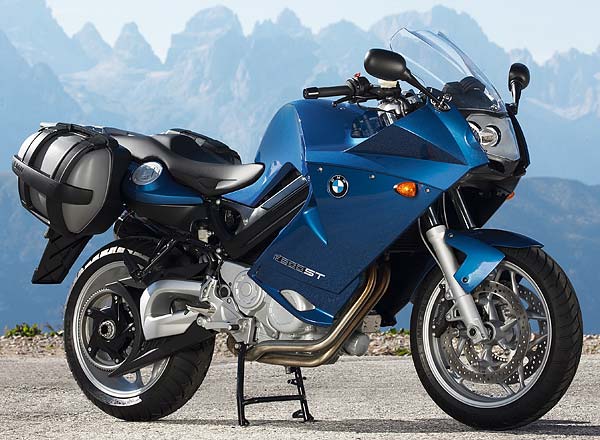
Sunday we jumped on the bike and spent the day exploring the North Yorkshire Moors.  All in all, we spent over six hours in the saddle, finding minor roads and fords to cross.  For lunch we had a break at the very nice but extremely busy Magpie Cafe in Whitby.

The wonderful warm sunny weather on the Sunday really brought out the Motorcyclists and the Photographers.  I took the Nikon V1 outfit with me and a freshly charged battery, but I was having far too much fun on the bike to stop much and take pictures, but I do have some lovely memories of the beautiful scenery and a number of locations to head back to with the Medium Format Camera.

iPad – Perfect Tool for travelling Photographers? Part2

Is the iPad a suitable tool for the travelling photographer, well in certain areas yes.

Now I will be the first to admit its not going to replace your computer, but as a portable device is does have many attractions to the photographer.

We all should know by now the importance of backup.  Your photographs are not safe until you have a second copy of them.  For a number of years now, many photographers have been carrying portable backup devices like the Epson pictured above.  These small dedicated devices have small hard drives in them and a card reader to quickly backup your cards.

I now use the iPad for this task, and while the storage is limited, you can review your images on the large screen and cut the chaff from the wheat so to speak.

For users of Adobe Lightroom, there is a product called PhotoSmith, once your photographs are safe on the iPad you can use this to add your metadata and key words. Once your back at your office you can sync with your computer and your photographs are where they belong and the boring task of adding metadata and key wording is already done.

So that covers backup and some of the more boring data management task but what about the creative function.

After Photosmith my next most used app is SnapSeed.  This is a great app from Nik software who make possibly one of the best Black & White Converters available.  If you after processing your RAW files and trying out different ideas then this is the ideal app.

From simple Black & White conversions like this to more adventures and dramatic shots.

For studio users, Elinchrom have released their remote control application, I can now remotely adjust the power and settings of my Elinchrom flash heads direct from my iPad.

While I have not tried it myself there are now wireless tethering options.

With the release now of Photoshop Touch and iPhoto more and more advanced post processing techniques can be used.  Whilst you might not end up publishing shots produced on your iPad due to limitations on the size of files it can handle, it makes a great tool for when you feel inspired and want to try out ideas.

Lastly we have not mentioned portfolio displays.  The iPad makes a great way of showing off your photographs to potential clients.

Whilst they may be better ways of accomplishing many of these tasks, the iPad can do a very satisfactory job, and it is small, light and how many laptops have 10 hours of battery life.

If you feel only a real computer will do then take a look at Apple’s MacBook Air, the 11inch model is not much bigger and the i7 version with 250GB solid state hard disk and 4GB of RAM is far faster and more powerful then the spec would suggest.

New iPad – Perfect Tool for travelling Photographers? Part1

The title of this blog post is far more impressive then the actual content 😉 As I am sure most of you know, the new iPad was announced yesterday.

I’ll leave the details for others to write about, but later i’ll blog about some of the apps I use in iOS to make my Photographic life easier.

See Chris’s Blog for more details on the new iPad.

The big two announcements recently were of course Adobe Photoshop Touch and the New Apple iPhoto. It’s apps like this that are beginning to move the iPad from a passive viewing type device to a creative device.

Adobe Lightroom V4 released

Well after a relatively short beta period, Adobe Lightroom V4 has been released.

Lots of information and training is now becoming available so I would advise you to check out some of the free on line tutorials and if your going to purchase V4 and want to make the best of it, I can recommend either the video tutorials from either Kelby Training or The Luminous Landscape.

For more info on V4 check out lightroomkillertips.com and Chris’s Blog for more info and links.

For version 2 and 3 I upgraded immediately as there was functionality I really wanted to use straight away. Now I think I may wait. Last time when Adobe Photoshop CS5 was released they did a double upgrade offer that made the Lightroom upgrade a lot cheaper. Hopefully they will do the same this year.

Monitor Calibration and OS X Lion

Monitor calibration is critical for photographers.  There is no point in trying to do extensive post production on an image if you have no idea what your monitor is actually displaying.

To this end I use the X-Rite i-1 Display 2.  This is a version of their profiler that is no longer available.

When OS X Lion was released many people were surprised that their Profilers no longer worked.  Unfortunately the profiling software was written for Macs with PowerPC processors.  Until Lion, all Macs came with translation software that enabled them to run  software written for the older Macs.

Luckily X Rite have released a native Intel version for Modern Macs running OS X Lion and even for older versions like mine.  If you are a registered user you can login and download the new version.

Changeable Weather

I find it hard to believe how changeable the weather has been recently.

Last Sunday was cold but bright and a great morning’s Photography was had.

The first half of this week has been dull and overcast but temperatures have been gradually rising, culminating with Thursday being one of the warmest days, a record for this time of year.  Not only that but we had bright blue skies and lovely sunshine all day long.

With the week just getting better I started to make some plans for the weekend. Possibly a long motorcycle ride to the North York Moors, with camera in hand of course for the Sunday.

Instead the weather is looking decidedly dodgy in the forecast.

We have another day at Whisby Nature Reserve on Saturday for Day 3 of our Bee Keeping Course, which we are looking forward to, so if the weather is nice we will try some more bird photography and hope for a nice Sunday.

One of the joys of living in the British Isle, the weather forecast can often be wrong.