Rolling Back to Lightroom v2015.1.1

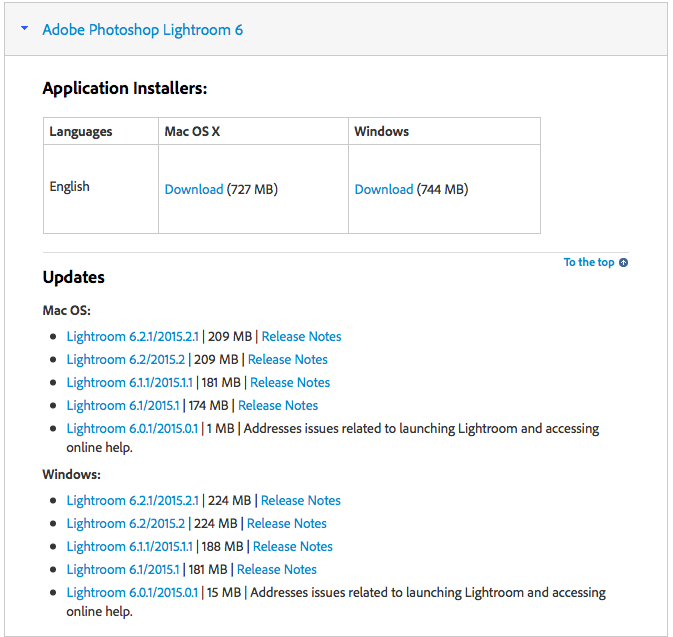
Download Lightroom


Tonight I got fed up of waiting for Adobe to fix Lightroom so downgraded my Laptop to Adobe Lightroom v2015.1.1.  You can download it from here: https://helpx.adobe.com/lightroom/kb/lightroom-downloads.html?PID=7252638

Lightroom

Its a simple task, uninstall the old version, download the main Lightroom v2015 then the update you want.  I then went though my Orkney images and completed my Panoramic’s light this one below:

StornowayI’ll be leaving this version on my Laptop now until Adobe issue a fix and I have tested it on my main machine, at least now I can finish up editing my Orkney photographs.


Adobe Issues – Lightroom v2015.2.1

Orkney Sea ScapeThe shot above was take with my Leica while on board ship, as I came back to Scotland from the Orkney Islands.

Its a stitch from several images which I put together with Adobe Lightroom v2015.1, quite a nice photograph I hope you agree and a very good stitch done automatically via Lightroom.

I still have a number of photographs still to process from my Orkney trip including a number of panorama’s that still need stitching together and some HDR’s that need putting together.

These personal photographs have been on hold for the last few weeks while I finish up my final Wedding Photographs for customers.

But now its back to my own work.  Now I blogged early that Lightroom 2015.2 had been released and it had some issues.  Every time I tried to exit the program it would hang.  The fix I posted early was a work round that stopped that at least.  Well I also found another issue, you cannot create Pano’s from Leica DNG files, I do not if all RAW files are affected or if its just a DNG issue.

Well last night Adobe issued a fix, Lightroom 2015.2.1.  So I tested and the crashing is still there, in fact it crashed the first time I loaded it and the Pano function is still broken.

Now I had to produce some prints this week for a commercial shoot I had done earlier in the year, now I wanted to test printing from Lightroom on Apple’s latest OS, so as I have already upgraded my laptop, I created a new Lightroom catalogue containing these shots and fired up my laptop to print off the images.  Now it all worked fine, in fact not one crash, but I had not done the Adobe workaround on my laptop.

So I checked out a few forums and a number of people mentioned that if they created a new library referencing all there old photographs the new Library did not crash, so last night I gave it a try.  I created a whole new library referencing my existing photographs and guess what, no crash.

So Adobe; please, please , Please, just now fix the pano issue so I can finish up my Orkney Photographs.


Adobe Lightroom 2015.2 Known issues

I have only upgraded my Laptop to Apple’s latest OS but have upgraded both my laptop and desktop to the latest Adobe Lightroom 2015.2, usually point releases have few issues.

I had a few prints to run off for a client yesterday and it gave me the perfect opportunity to test Lightroom 2015.2, the new Mac OS and my Epson Printer, a 3880.  No issues at all.

One issue I do have is on my main machine since upgrading Lightroom but running the old Mac OS.

I cannot seem to close Lightroom, it hangs.

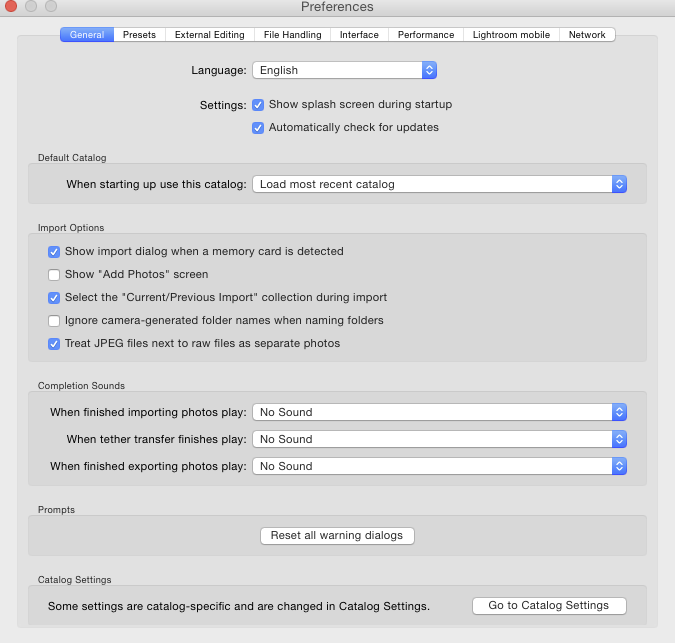
A quick search on the web found the following article from Adobe Support.  Unticking the “Show Add Photos’ seems to have fixed it for me.

Screen Shot 2015-10-07 at 08.43.21


  • Tethering with Nikon & Leica cameras

Tethering Nikon & Leica cameras using Lightroom CC 2015/Lightroom 6 is not currently supported on El Capitan.

We recommend customers who rely on Lightroom for tethering Nikon and Leica cameras not upgrade to El Capitan at this time.

Our engineering team is working with our partners to correct this issue and provide compatibility in the future.

 Some customers are reporting crashes with Lightroom CC 2015.2/Lightroom 6.2

  • If you are experiencing crashing, please try the following:
  • Go to Lightroom > Preferences.
  • Click on the General tab
  • Uncheck “Show ‘Add Photos’ Screen”Restart Lightroom

Our engineering team is actively investigating this issue

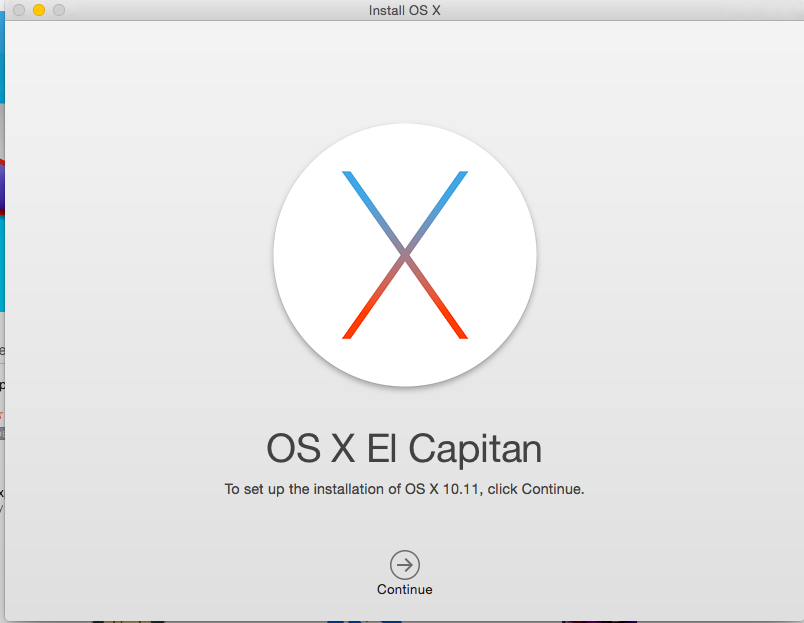
OS X 10.11.0 El Capitan

OS X 10.11This weekend I updated my seven year old MacBook Pro to OS X 10.11.0 El Capitan.

The issue found initially was that Dropbox would not work, I visited their website and downloaded the latest client and after that things were fine.

So far apart from the usual built in apps, like Safari and Mail I have only tested Adobe Lightroom 2015.1.1.  So far no issues.  I still have lots of things to test but once I have proved all my key apps and also the screen calibrater, Wacom tablet and Epson printer and scanner work, i’ll risk updating my main work machine the MacPro once OS X 10.11.1 is released.


Apple Releases OS X 10.11

Apple released the latest version of OS X its called El Capitan an odd name but there are making some bold claims for this minor OS update. 

The big thing for graphic users is Metal a new API layer to access the graphics card. Apple claim 40-60% speed improvement and Adobe after testing an optimised version of Photoshop are backing that claim. 

I will not be risking my work machine until OS 10.11.1 is released but I may upgrade my laptop this weekend and test all my apps. 

I cannot risk breaking printing, screen calibrating software and my Wacom tablet. So testing on another machine or cloning your hard drive and testing on a spare is always a good idea. 

Apple Release iOS9.0.1

imagesApple released iOS 9.0.1 yesterday and I see it should have fixed the issue that prevented me from upgrading my iPhone 5.  I’ll be waiting until the weekend before trying and i’ll be having a good read on the forums to see what issues people are having.

Wifi Calling

If like me you live in a remote village then mobile phone coverage is limited.  The last few versions of the iPhone have supported WiFi calling but its a feature that few carriers seem to want to implement for their customers.

Orange or as its now known EE turned it on earlier this year but only for customers who bought there phones from them.

I switched to Vodafone last year as its the only network I could get any cover in my village but even then its touch and go.  Well they have now announced wifi calling starting this month so I wait for a carrier update but I am not too hopefull as there website says its going to be for the iPhone 6s and 6s Plus only.  Lets hope that’s not true.

Upgrading my Apple AirPort Extreme 

I purchased a new Apple AirPort Extreme this week. The idea is to move the old one into the end room recently decorated, which together with the two AirPort Expresses, covering my office and master bedroom would cover the whole house. 

As I often am with Apple I was very surprised at the ease at which things went. 

I plugged in and the AirPort Utility on the Mac discovered the new device and gave me three options. 

  • Migrate setting from Existing AirPort Extreme and replace
  • Add to existing network
  • Setup as a new network

I took the first option and after a few minutes it prompted me to transfer the cables from the external harddisk and BT router from the old AirPort to the new. This I did and after a few minutes everything was back up and running on the new device. 

I then ran the wizard and added the old Airport in to the existing network as a wireless extender. Once setup I unplugged the old AirPort and plugged it into the room. 

Easy. 

On line Storage – in the Cloud

Dropbox, Microsoft OneDrive, Google, Adobe Creative cloud and of course Apple’s iCloud; not to mention all the other third party smaller solutions.

Currently I have 2.8 Gb of free dropbox, 5 GB free iCloud and 20 GB of Creative Cloud, but none of this is good enough for hosting current projects and keeping my five star images safe on line.

I have started to look again at online solutions as last week I had two disk fails, one hosting a current Wedding photographs I was editing and another hosting my live Master Lightroom library.

Now lucky I lost nothing, I always try and keep at least three backups at home and one off site but I was worried for a while.

Maintaining off site backups is a pain and there generally about a month out of date so I am sure you can see why I have started to look at online ‘cloud’ backups again.

Now usually these things are quite straight forward, if your a Microsoft user and/or MS Office users Microsoft’s OneDrive is the one to go for.  Google is fine if you trust them with your images but they are out to make money out of your by targeted advertising, possibly not for storing a clients images on.

As an Apple user then you may think I would suggest that, well up to this week that would have been a no, they were too expensive but with this weeks price drop they are now only a couple of pounds a year dearer then Dropbox with the new iDriveApp for the iPhone it may become an option but currently for me Dropbox is at the top of my list.

iOS 9 is out

Well its out and on the whole for a maintenance release I am quite pleased, some nice improvements and it seems to be working fine on our iPad2 and iPhone6.

images

What I am not happy is about is the update of our iPhone5.  I basically hung at the slide to continue screen.  No matter what I did, reboots restores etc, nothing could get it working except to setup as a new phone, not something I wanted to do.

Apple have suggested a fix on their support site but it did not work for me.

In the end the fix was to download iOS 8 and restore that then restore the data.  So now I am back to OS8 on the iPhone5 until Apple come up with a fix.

Instructions from https://www.reddit.com/r/ios9/comments/3l7nt8/slide_to_upgrade_freeze_iphone_5c/

To go back:

Step 1 – Backup your pictures! Even though you can’t get to your phone and use it you should still be able to backup your pictures

Step 2 – Download IOS 8.4.1 for your iPhone or iPad from this site –> https://ipsw.me/8.4.1

If you are confused which file to download check the model on back of your phone and use site below to determine the version you need.

https://www.theiphonewiki.com/wiki/Models

The file was taking a while to download for my phone so I searched the filename on Google and downloaded from Mega.

Step 3 – Reboot phone into DFU mode – hold down power button and home button – when it reboots let go of power button – still hold home button

At this point it will ask you to connect your phone to iTunes – will have to connect phone to the computer.

Step 4 – Hold down the Option (Mac) or Shift (Windows) and and then click restore.

Step 5 – Browse to the 8.4.1 file you downloaded and select it. This should restore to the previous IOS version. Note: This will wipe phone.

Step 6 – Restore from backup. Hope that you backed up before attempting to update.