Powercuts

Well after the power cut at my home village earlier in the week giving me lots of fun with Lightroom, we had another bigger power cut this evening taking out a lot of Lincoln and the surrounding area.

Film Scans in LR4
Film Scans in LR4

It made me think about our modern reliance on power and so tonight I packed my Hasselblad bag with some medium format film and am going to try and shoot some film for the next few days.

The down side is that I will not be able to share the images, well at least not for a few months with you on this site as it takes me a while to finish a roll of film, get it developed and scanned and published.

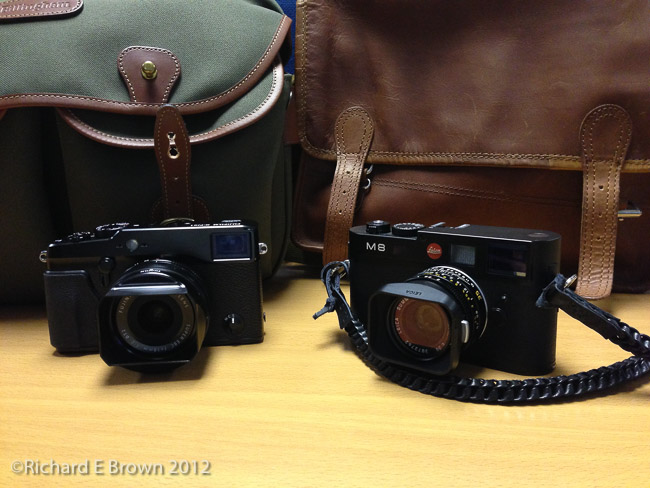
So i’ll also take my Leica M8 for some fun shots.

Editing – sorting the wheat from the chaff

If I am shooting fixed subjects like landscapes or buildings then is likely to only be a few shots of each scene. When shooting wildlife or people then I can end up with a thousand or more images to have to sort through.Lightroom editing

Well the first job is to get those image on to internal hard disk of my computer. I then import and copy them into the local Lightroom. The import also copied the files to an external disk. Once the majority of the editing is complete the Lightroom files get moved to external disk. By this time Apple’s time machine will also have a copy on its disk so I’ll havE several copies before the memory cards get wiped and I also clear down the local hard disk for the next set of images.

Something to remember with Adobe Lightroom V5 is that you can create something called a smart preview. This enables you to edit and image but not actually have the image with you, great for when your out and a about but wanting to get some work done on an old MacBook Air with only a small SSD inside.

So you now have a thousand or so images sat in Lightroom, how do you quickly find the great ones. Well there are several ways but I find it a lot easier if I use two monitors, one set to grid view and the other set to loupe.  This enables you to flick through the your images in grid view but evaluate them properly.

I also tend to group similar photographs together, you can then just pick a couple of good ones that ones that are very similar.

I also find its good to do an edit close to taking the photographs but also go back over your old work and look again at the ones you did not select.  To often you can chose photographs because of the amount of effort it took to capture and not based on the content.  Time can be a good equaliser.

Diagnosing Adobe Lightroom Issues

KeyboardAfter the fun of yesterday I thought I would blog a few notes on diagnosing start-up issues with Adobe Lightroom V5.

First step is to see if its your catalogue where the problem lies or with the app or plug-in.  Try opening another catalogue, or if that does not work then create a new catalogue.  Option-Click on the Adobe Lightroom icon and when it launches it will prompt you to open an existing catalogue or create a new one.

Yesterday I could create a new catalogue but once I had closed the catalogue it would not re-open.

Once you have ruled out the catalogue which is unlikely you can try resetting your preferences.

The following is direct from Adobe’s website:

Reset your preferences

To reset your preferences, do the following:

  1. Quit Lightroom.
  2. Navigate to the preferences file:
    • Mac OS: /Users/[user name]/Library/Preferences/com.adobe.Lightroom5.plist
    • Windows 7, 8: C:\Users\[user name]\AppData\Roaming\Adobe\Lightroom\Preferences\Lightroom 5 Preferences.agprefs
  3. Drag the preferences file to the Recycle Bin (Windows) or Trash (Mac OS).

Recent versions of Mac OS have hidden the Library folder under the user account so a quick way of getting there is to press Command-Shift-G then in the box type:

~/Library

This will take you to your library folder where you can find and delete the preferences file.

This fixed many issues in Adobe Lightroom V4 and V5 but it did not fix mine.

The next step is to disable your plug-ins, you might wonder how if Adobe Lightroom is hanging on startup but if you remember to hold the Option key as you click on the application icon, create a new catalogue then once in disable your plug-ins.

If this fixes your issue you can then start up a plug-in at a time, shutting down Lightroom and restarting each time until you find the plug-in that causes the issue.

You can then replace the plug-in which should fix the issue.

Timing – things always go wrong at the worst time

I had a great shoot on Sunday with the lovely Amy, so today I was keen to get some photographs processed and posted up.

Amy and the Tree

Sunday evening I imported all the photographs and backed everything up.  Then Monday I made a quick start editing a couple so I send some to Amy.  Then just at the worst time we had a power cut.  I had no idea when it would come back so I had to stop and go to work in Lincoln.

Tonight I promised myself to work hard and at least get some basic processing and key wording done.  Well Adobe Lightroom V5 would not open, not matter what I tried.  My current catalogue and some older catalogues would just hang.  I tried the Option-Click trick and opened Lightroom with a fresh new catalogue and that would work, but when I exited, once again Lightroom would hand when I tried to open it, even opening the new catalogue I had just created.

I deleted the preferences and also tried removing the templates as that in the past has caused issues, all to no avail.  The trick that finally got things up and working was to Option-Click, create a new catalogue, then while I was in the blank catalogue, go through and disable all my plug-ins.  Adobe Lightroom now works and I quickly produced the above image.

I still have to figure out which plug-in is causing the issue but that can wait until another day.  I have editing to do.

a camera in need of glass

Sony Alpha A7r

Sony have really been pushing at the envelope of camera design in the last few years, with DSLR’s with EVF’s, the Sony NEX range with the great NEX-7 and NEX-6 and now the new A7 and A7-R.

One thing I have noticed about these cameras is that I see a lot of pro photographers who have them, using third party glass.  While the good glass is slowly coming is been manufacturers like Leica who have made great sales from these cameras.

While shooting wider then 24mm can be troublesome using Leica glass on the Sony as the cameras lack the special micro lens that Leica have developed for the Leica M range, it still gives great results.

While releasing good cameras is one thing its the system that can make or break a camera.

Why shoot a Leica

Shopping for Antiques

Chris Bennett recent made an interesting blog post about DSLR ver Mirrorless cameras.

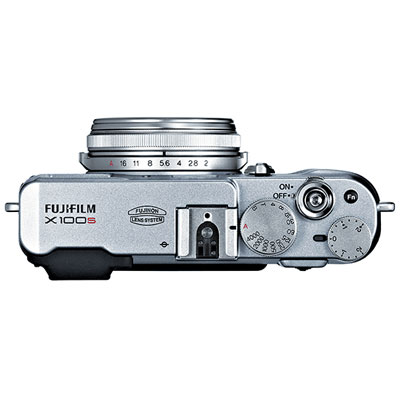
In the article he mentioned that I shoot with two Leica’s for my street photography. Since the introduction of the SLR in the sixties the Leica rangefinder and of course range finders in general (I also love the Nikon S) became very much a niche product.

Today Leica is again very popular, but not their cameras, it’s the lens that people love.

With the introduction of the Mirrorless camera many old lens have become popular again. Due to mount design and very small flange distance, just about any lens can be fitted.

But why are Leica lens so popular? Well there are a number of reasons, first the image quality is second to none. Second is the size, three high quality primes easily fit into a large coat pocket.

Leica M4 Film
Leica M4 Film

Of course there are odd people like me who love not only Leica lens but Leica cameras as well.  What is it about a Leica that causes people to still use them, effuse about them and generally love them, despite the price.

My M4 has no meter, no auto modes, its as basic as they come.  The viewfinder of both the M4 and all Leica M’s for that matter does not show exactly what you will get it in fact shows a lot more depending on lens.  I find that when out shooting with the M4 I really have to think hard about my photography.  I have to regularly meter with an external light meter, and meter in different directions in Autumn, Winter and Spring.  If shooting with the sun behind and then I see something to the side I may have to change the exposure by up to two stops.  I have to be fully aware all the time what the light is doing around me.

Steep Hill GigWhat then about the M8.  This is Leica’s first digital Leica.  So it does have some automation.  A built in light meter which is basic but functional.  You still need to consider what the light is doing and how it may fool the meter.

So using the Leica’s makes me much more aware of what is going on around me and that can only be a good thing, I have to be prepared, have the camera pre-set and pre-focussed. No autofocus on any Leica M.

But what makes an M an M.  Well if you know your German, you may know.  Messsucher is the German would for Viewfinder and Rangefinder combined which is what a Leica M is and is all about.

If you have ever used a professional full frame Nikon like an D3, or a Medium Format Camera you will realise that since the we got digital viewfinders have been going down hill.  The viewfinder in a Leica M is simply brilliant, and by that I mean bright and easy to use and focus.  You can see clearly and in low light, more importantly with the frame lines you can see what is about to come into the picture and so pick the decisive moment.  I makes capturing these moments even with the lack of automation easier.

The rangefinder is not an easy focusing method, it requires regularly practice, and I find if I have not used the Leica’s for a few weeks it takes me longer to focus then any other method, but once in practice is is surprisingly fast.  You may be interested that in the last year of shooting with my M’s I have only one badly focussed picture.

So the Leica M, not a camera for everyone but one that rewards practice and the pictures I take with it, I know are the result of my hard work and not the computer in the camera.

Wacom Tablet – starting with the Pen

Wacom Intuos Pro

With the house move as well as Caroline having her own sewing and craft room, I have my own office which I use as my digital darkroom.  I am still in the process of getting everything set up the way I want but one of the new purchases to make editing easier is my new Wacom Intuos Pro Tablet.

When you talk about Tablets then Wacom are the market leader.  Many people love tablets others prefer the mouse.  If your thinking of trying one then you have to give it a good try.  The analogy I heard was this “For the first week its likely trying to use a paint brush with your feet.”

I have to admit, the first few days were difficult, I could definitely use a mouse or tack pad a lot easier and get better results.  I have now been practicing for just over a week, a mix of just messing about, plus some actual serious editing in Adobe Lightroom and Adobe Photoshop, but as well as that, I have been using it for just general web browsing and controlling the computer.  I am now getting to the point where it is starting to get to feel natural.

This weekend I gave it a good try out in Adobe Illustrator, I made a scale plan of the bottom of the back garden so I could start to make a plan of where to site the chicken coup and bee hives to fit in with the current garden layout as I wanted to leave the main tree and statue that we have at the back.  It was my first time using Adobe Illustrator and its a very odd program.  Like its name sake Adobe Photoshop it has a very steep learning curve. I watched a few tutorial videos on the internet but it is still a very confusing program for a beginner like me to get the hang off.  Still it allowed me to use use the tablet while I concentrated on the program.

Cold Snap

20131122-070427.jpg
The quick arctic blast came and went. It started with a minor frost in the morning so did not effect the commute into Lincoln. The evening was another matter, travelling home in -2.5C at night on country roads is no fun. Still it makes the photography interesting. The frosty lincoln west common with low sun through the trees looked very pretty.

I often see nice photo opportunities when stuck on my morning commute. They never seem quite as nice when I go back with some free time and a camera. Such is a photographers life.

The moment

Henri Cartier Bresson is well know for the concept of “the decisive moment”.

My Picture of the month the other month (Sept) is a good example of this.

Dancing in Air
Dancing in Air

Where people are involved, there is often a particular moment that makes the image stronger.

Photo Walk
Photo Walk

Heading to the shops Jubilee Dress

Try to anticipate the moment where the composition is strongest and capture that moment.  You will capture stronger images for it.